Design System & Storybook

Work in Progress

A Design System for AI and Agentic Products

The Obliq AI & Agentic Design System is a front-end library I am building for products where AI acts on a person’s behalf. The groundwork started in Figma. The refined version is being built in code as a Storybook, which is faster to change and easier to try. The plan is to draw the finished library back into Figma.

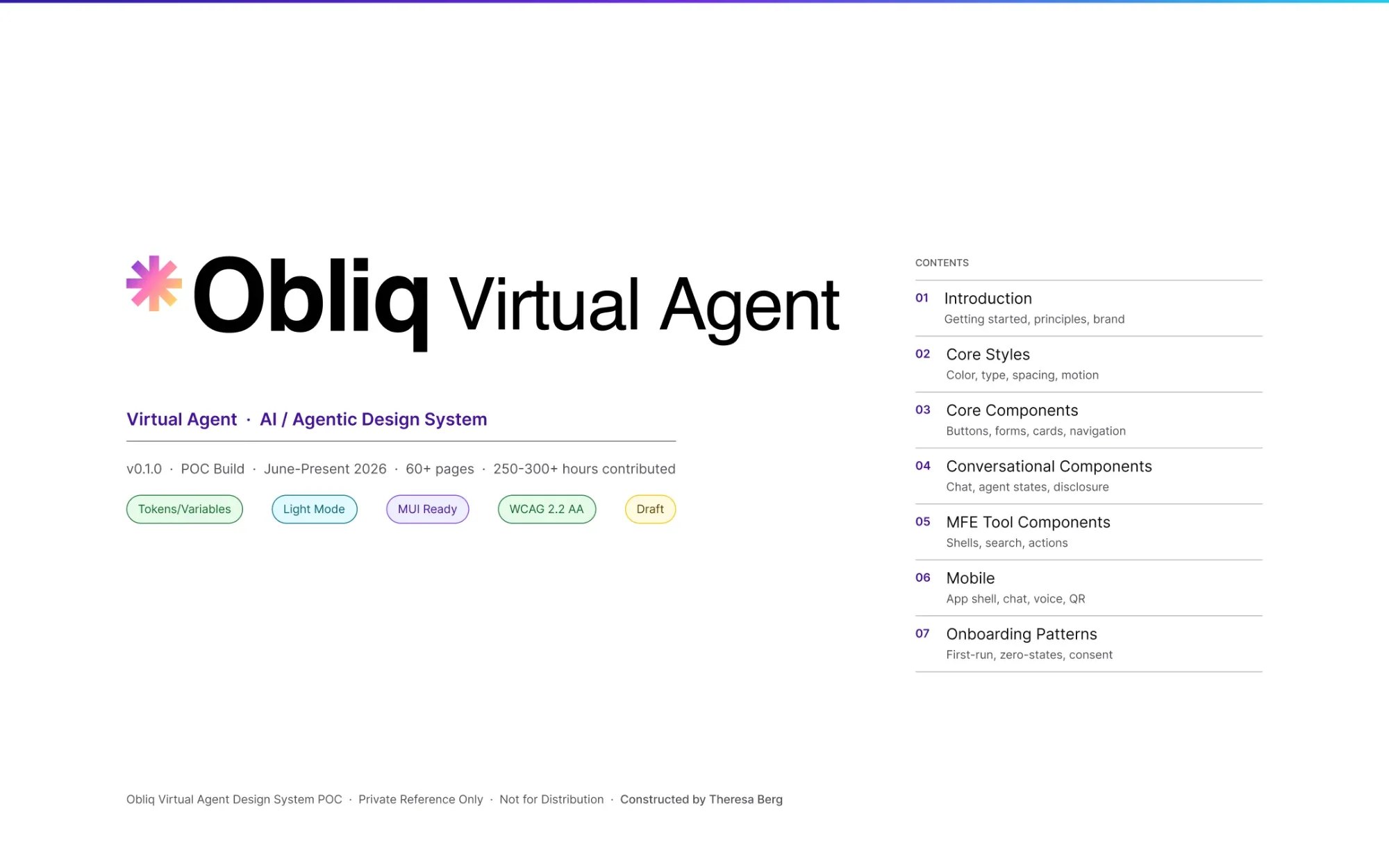
The cover of the Obliq AI & Agentic Design System Figma file, with its contents: introduction, core styles, core components, conversational components, tool components, mobile and onboarding patterns.

How It Is Being Built

Figma for the Groundwork, Code for the Refined Version

Each tool is used for what it does fastest. Figma is quickest for laying things out and naming them. Code is quickest for trying a component, changing it and checking it.

  1. Lay the Groundwork in Figma

    Foundations, principles and the first components are drawn and named where a sketch or a rule is quickest to place.

  2. Rebuild It in Code

    Each component is built in React and shown in a Storybook with every state, so it can be clicked, tabbed through and tested instead of only looked at.

  3. Check It Before It Counts

    Every color pair is tested for contrast, every story is checked for accessibility and each rule is written beside the part it governs.

  4. Draw It Back Into Figma

    The plan is to re-render the settled library in Figma, so designers can use the same parts there that engineers use in code.

Skin and Skeleton

Two Pieces of One System

My argument on AI Resources is that design owns the Skin, the identity and tokens that make a product recognizably itself, and engineering owns the Skeleton, the component library that ships. The Obliq AI & Agentic Design System is that argument built as its two pieces, side by side.

The cover of the Obliq AI & Agentic Design System Figma file, with its contents: introduction, core styles, core components, conversational components, tool components, mobile and onboarding patterns.

The Skin

The Figma File

Where the look and the intent are set: foundations, tokens, principles and the first components, drawn and named by a designer. The file opens with a cover and a contents list that runs from the introduction to onboarding patterns.

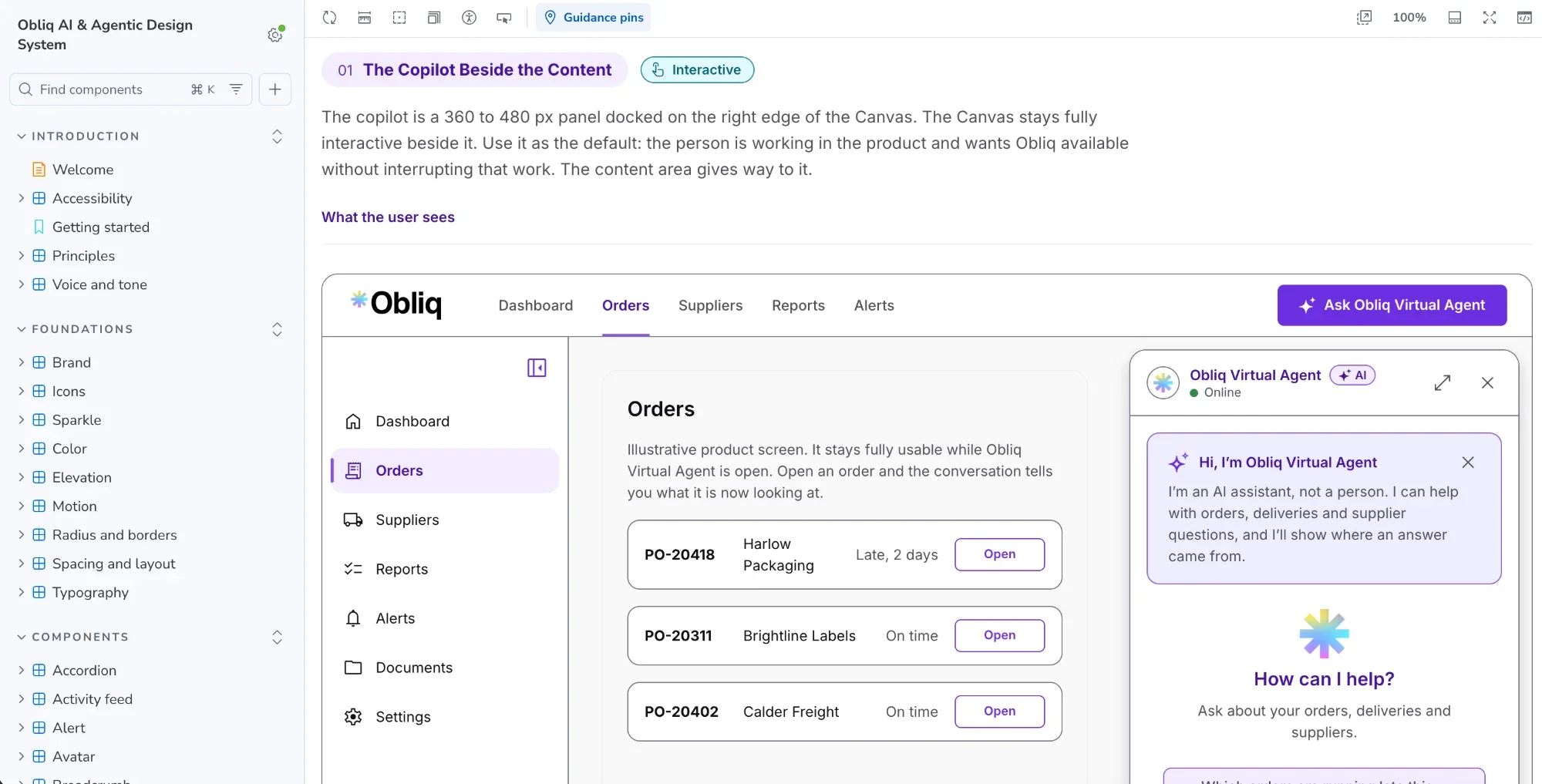
A page of the Obliq AI & Agentic Design System Storybook: the sidebar of components, and the side-panel assistant docked beside an orders screen.

The Skeleton

The Storybook

Where the parts work: the front-end library rebuilt in code, with every component shown in every state and the rule beside it, so it can be clicked, tabbed through and tested instead of only looked at.

See the whole argument on AI Resources →

What It Covers

The Parts Every AI Product Ends Up Needing

It starts with foundations and shared components, then the patterns that keep a person in charge when software acts for them.

Foundations

Color, Type, Space and Motion

One set of tokens for color, type, spacing, radius, elevation and motion, with every color pair tested for contrast and a reduced-motion rule for every animation.

Components

Buttons, Fields, Cards, Alerts and Dialogs

Shared parts with every state shown, built to work with a keyboard and a screen reader, plus the AI parts: the Composer, the Tool Card and the confidence indicator.

Human Control

Trust, Escalation and Takeover

Patterns for showing what the AI knows and does not, asking before it acts, and handing a person the wheel when it should: approval gates, autonomy levels, escalation and takeover.

Notifications

Alerts, Rules and Policies

How alerts are raised, who is told and when, and how a person tunes it: alert rules, escalation policies and notification preferences.

Disclosure

Saying It Is AI, Plainly

Labels, notices and consent screens that tell a person they are dealing with AI. All wording about law, consent and disclosure is example wording, written to help teams ask better questions, and needs review by qualified legal counsel before it is published.

Conversation

Screens for Talking to AI

The Composer, messages, rich answers and the full-screen and side-panel layouts a conversation lives in.

How I Made It

I Taught Claude to Know Me, in Plain Files

The Obliq AI & Agentic Design System is built with Claude Code and the Figma MCP server, which lets Claude read my Figma file directly: the design system, the pages still in progress and the frames themselves. The rest comes from markdown files that I wrote with Claude’s help: the design system’s rules, my case studies written and strategized in plain text, and how I like to work.

Those files are the point. I already understand communication. What I needed was for Claude to know me: my preferences, my voice and where I am weak. So I taught it how I want to work, researched my own gaps and wrote a strategy that I keep growing and testing. The aim is consistency in how Claude interprets me, not in how I interpret Claude.

The Skin in Figma: Pages Built From Markdown and the Design System

Each page below was built in Figma by Claude through the Figma MCP server, with the words from markdown and the parts from the design system in my file. Select one to see it whole.

  • Three Figma pages of human-in-the-loop patterns: starting with a real decision, setting scope before the agent acts, and making execution visible and interruptible, each with an example screen and the behavior to preserve.

    Human-in-the-Loop Patterns

    Human-in-the-Loop Patterns

  • Two Figma pages that follow one equipment alert from setup to response: who controls what, a user’s notification preferences and first activation, then an administrator defining an alert rule and reviewing an AI-suggested change.

    Notifications, Alert Rules and Escalation

    Notifications, Alert Rules and Escalation

The Skeleton

The Same System, Built and Tested in Code

These are screenshots of the Storybook, the front-end library rebuilt in code with every component shown in every state. They are not the Figma pages above, which hold the design. Select any picture to see it whole, or open the Storybook to try the interactive ones.

The Canvas

The Copilot, Full Screen and a Tool in the Page

The Canvas is the product’s own workspace, and the AI assistant never takes its place. It docks beside the content as a copilot, takes the whole content area in full screen, or sits one press away while a tool opens inside the page. In each case the user keeps working and neither side loses the other’s work.

  • The Storybook page for the Canvas: an orders screen with the AI assistant docked on the right as a copilot, a greeting, suggested questions and a message box.

    The Canvas With the Copilot Docked

    The Canvas With the Copilot Docked

  • The Storybook page for full screen: the conversation fills the content area while the sidebar steps down to a narrow rail, showing an answer with a confidence label and its sources.

    Full Screen on the Canvas

    Full Screen on the Canvas

  • The Storybook page for embedded mode: a supplier document search and send tool open inside the orders page, with the copilot docked beside it.

    A Document Search Tool Embedded in the Page

    A Document Search Tool Embedded in the Page

Agentic Patterns

Set Scope Before the AI Acts, and Build What Sits Behind It

Setting scope comes first, and it matters most. Before the AI does anything, the screen states what it can read, what it can prepare, what needs a separate decision and what is never included, and the manual route stays open. The second page is what a mockup cannot show: the behavior engineers must build behind the screen, with a test named for every row.

  • The Storybook page for setting scope: a card listing the goal, read access, what the AI may prepare, what it must ask before doing and what is never included, beside the rule for when to use it.

    Set Scope Before the AI Acts

    Set Scope Before the AI Acts

  • The Storybook page of behavior that must exist behind the interface: a table of controls such as approval boundary, execution state and ownership, the system behavior each needs and the test that verifies it.

    Behavior That Must Exist Behind the Interface

    Behavior That Must Exist Behind the Interface

Interactive

Deciding When AI Is Appropriate

A live diagram walks five yes or no questions: whether the outcome can be undone, whether the cost of being wrong is bounded, whether the data is reliable, whether the person can check the result in under a minute, and whether the person could still do the task themselves next year. Every no lowers how much the AI may do, from suggesting to acting on its own with the person auditing. It runs in the Storybook, so it can be tried and not only looked at.

  • The Storybook’s interactive autonomy diagram: five yes or no gates on the left and, on the right, a ceiling card showing the level the answers allow and what the person and the AI each do at that level.

    Walking the Five Gates to a Ceiling

    Walking the Five Gates to a Ceiling

The Argument

Designers and Engineers Are Learning Each Other’s Languages

Design dictates the Skin and code dictates the Skeleton. That is the spine of this whole project: the Figma file is where design sets the look and the intent, and the Storybook is where code sets how each part behaves. Designers own design and engineers own code, and that stays true.

What changes is that AI lets each of us read and write a little of the other’s language. I can build and test in code, and engineers can read a design system as structured data. Nobody is replacing anybody. We are learning each other’s languages, which should let us scale further and work together more easily, as long as we stop seeing each other as competition.

How a team creates its design system, and how closely the Figma file and the code must match, is for each team to decide. I do not claim one right answer. I am arguing for the collaboration, and I think AI makes the need for it hard to ignore.

Everything here is a work in progress. The Figma file and the front-end library are a demo and a personal experiment, and they are what I have been able to build since June while handling a whole host of other responsibilities. They show a way of working, not a finished product.

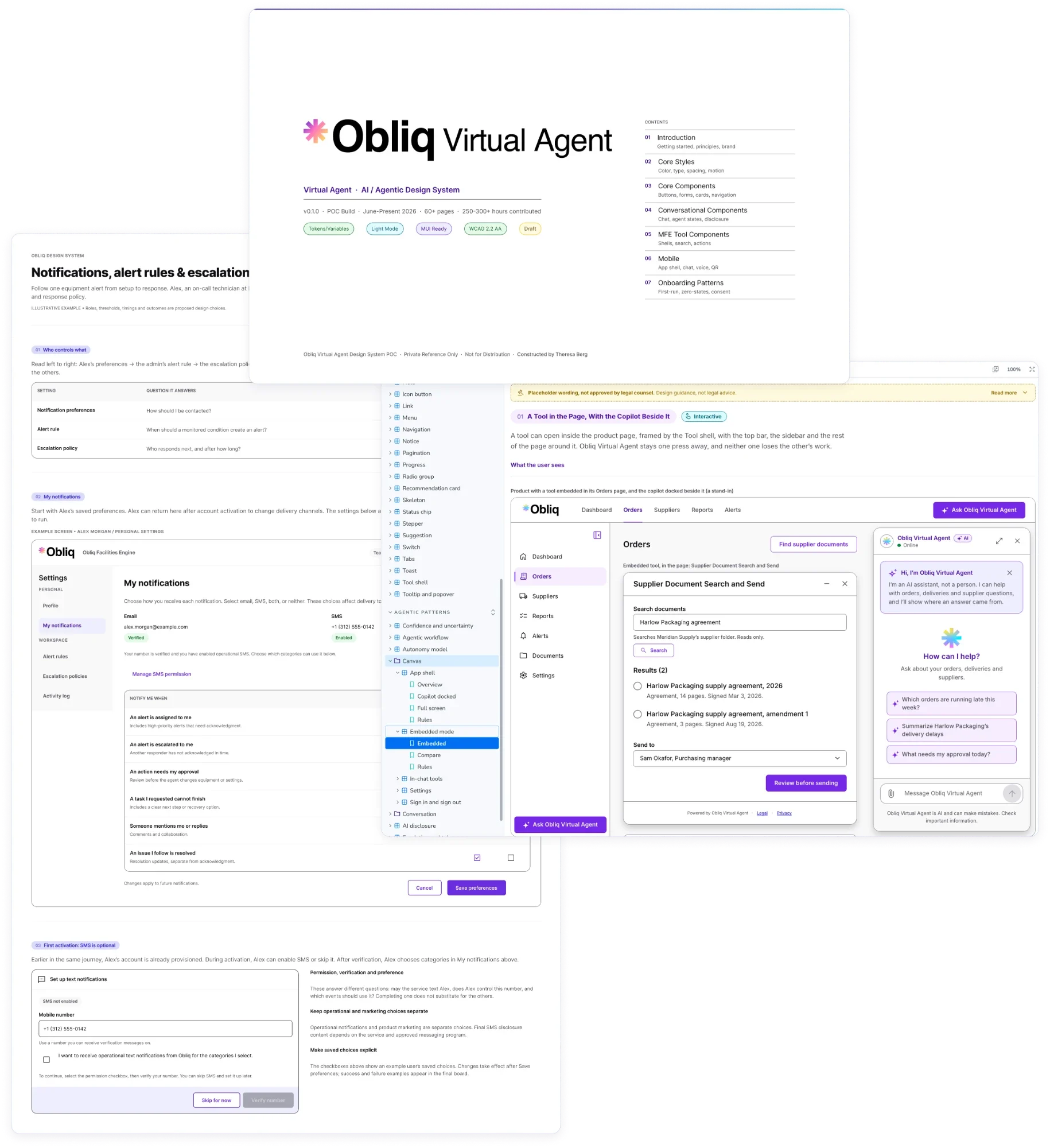
A collage of the work behind this page: the cover of the Obliq AI & Agentic Design System Figma file, a Figma page on notifications, alert rules and escalation, and a page of the Storybook showing a tool embedded in a product with the AI assistant beside it.

How I Work With AI

The Best Medium Is the One That Gets the Point Across

Some changes are quicker to make by hand in Figma than to describe to a model, so I make them there. Others are quicker to say out loud, to sketch on paper and photograph, to mark up on a screenshot or to write out. Each time, I pick whichever gets the point across fastest.

AI helps me do my job better. It does not replace what I do. After a year of working hands-on with Claude, I have learned a lot about prompting across different models, tools, devices and goals, and I think it is some of the most creative work a designer can do.

I have spent three years immersed in this world, sure it is where my industry and career were heading, and I have never been more excited by a change in technology. Research, synthesis and adapting what we know to new contexts are skills designers have practiced our whole careers. This is the next frontier for them. It is a step up, our legs may ache, and some of us will need to reach back and help others up. It is not a wall, and I expect tremendous progress on the other side.

When I need steadying, I look to the work of Michael Levin (opens in a new tab) at Tufts University, on how simple parts, from single cells to whole organisms, add up to collective intelligence. It has kept me grounded through these three years.

  • Speaking it
  • A photographed sketch
  • Writing it out
  • An annotated screenshot
  • Fixing it directly in Figma

Follow Along

See Where It Stands

The Figma file shows the groundwork today. The Storybook will show the refined version, with every component and pattern working.

See the design system this site is built from →